How to Use AI Agents for Texting (Without Sounding Like a Robot)
Learn how to use AI agents for texting in 2026. Practical guide covering what they are, how they work, and the fastest way to get better replies today.

You've probably heard the term "AI agents" thrown around in every tech headline this year. They book flights. They manage calendars. They write emails. But here's the use case nobody talks about enough: using AI agents to help you text better.
Not auto-reply bots. Not customer service chatbots. Actual AI that looks at the conversation you're stuck on and suggests what to say next -- in your voice, for your situation.
This is the practical guide. No jargon. No hype. Just how to actually use this stuff in 2026 without sounding like ChatGPT wrote your texts for you.
What even is an AI agent for texting?
An AI agent is software that can understand context, make decisions, and take action. When applied to texting, it means an AI that reads the conversation you're in and suggests replies based on what's actually happening -- not generic templates.
The difference between an AI agent and autocomplete is the difference between a GPS that recalculates your route and a road sign that says "North." One understands where you're trying to go. The other just points in a direction.
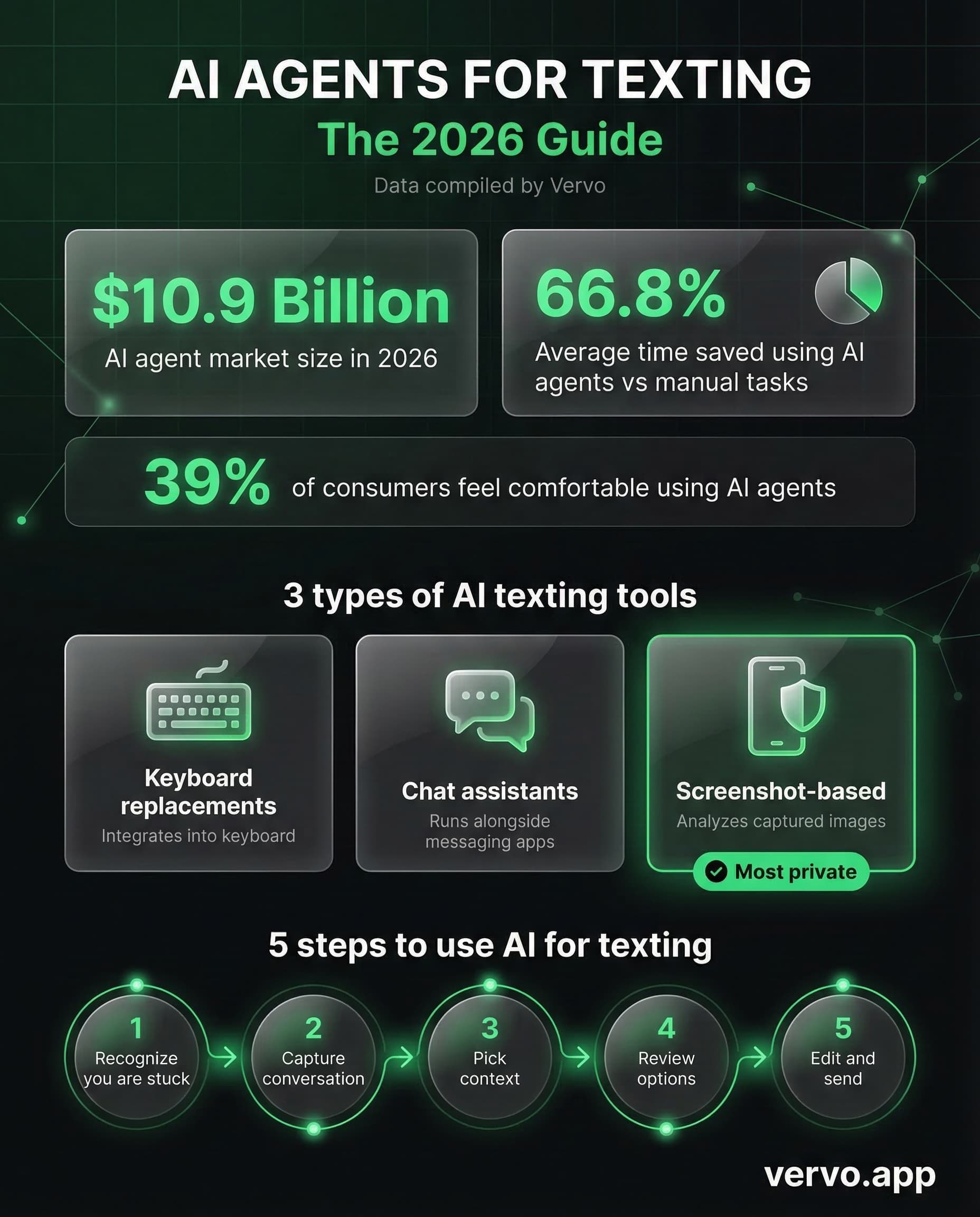
In 2026, AI agents are everywhere. Gartner projects that 40% of enterprise apps will include task-specific AI agents by year-end. But the consumer side is where it gets personal -- literally.
How do AI texting agents actually work?
Most AI texting tools follow the same basic loop:
- You provide context -- either by typing the conversation, pasting a screenshot, or connecting your messaging app
- The AI processes the situation -- it reads tone, relationship dynamics, timing, and what the other person said
- It generates multiple reply options -- usually 2-4 suggestions across different tones (casual, warm, direct)
- You pick, edit, and send -- the human always makes the final call
The key word there is "options." The best AI texting agents don't send messages for you. They give you choices. You're the pilot. The AI is the co-pilot who happens to be really good at reading the room.
That's the moment where an AI agent steps in. Not to replace your brain, but to unstick it.
What are the different types of AI texting tools?
Not all AI texting tools work the same way. Here's the landscape:
Keyboard replacements
Apps like Keys AI replace your phone's keyboard entirely. They read every message in every app -- iMessage, WhatsApp, Slack, your banking app, everything. They offer real-time suggestions as you type.
The upside: seamless integration. The downside: a third-party app reading all your private messages, including ones with sensitive financial or medical information. That's a significant privacy tradeoff most people don't think about until it's too late.
Chat-based AI assistants
Tools like ChatGPT or Claude where you copy-paste the conversation and ask for help. They work, but the process is clunky -- switch apps, paste context, read output, switch back, type it out. By the time you've done all that, the moment has passed.
Screenshot-based suggestion tools
This is what vervo.app does. You screenshot the conversation, the AI reads it with vision, and gives you three reply options across different tones. No keyboard access. No message database. The screenshot gets processed and immediately discarded.
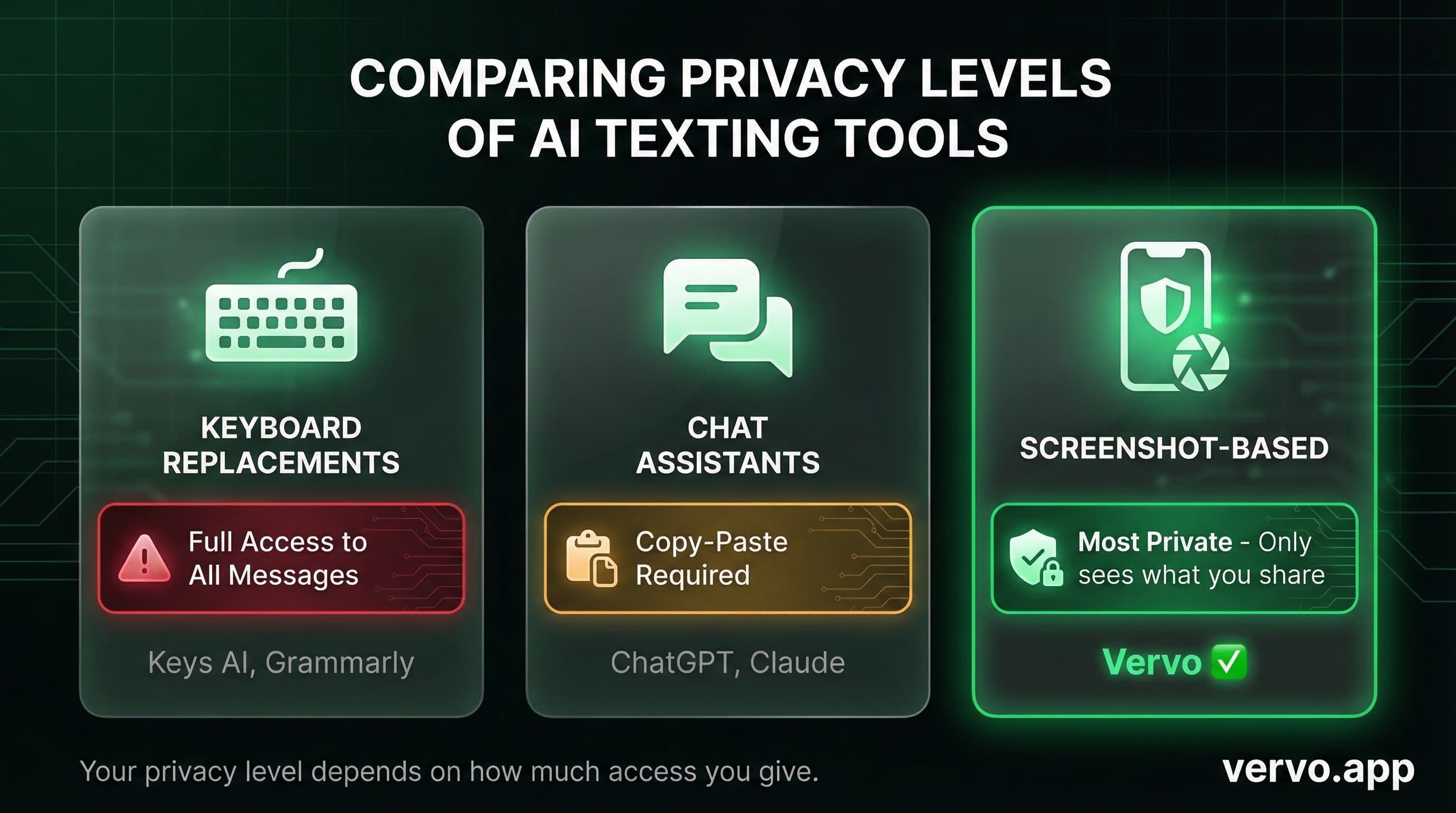
The privacy difference matters more than you think. When I compared five AI texting apps, the ones that required keyboard access had access to literally everything you type -- passwords, credit card numbers, private conversations with your therapist. Screenshot tools only see what you choose to show them.
How to actually use an AI agent for your texts (step by step)
Here's the practical workflow that works whether you're stuck on a text from your ex, trying to flirt without being weird, or figuring out how to text your boss about something uncomfortable.
Step 1: Recognize you're stuck
The moment you've been staring at a text for more than 30 seconds, you're overthinking it. That's the signal. Most of us do it -- especially with high-stakes messages like the ones from a crush, an ex, or a boss.
Step 2: Capture the conversation
With screenshot-based tools, just screenshot the thread. The AI needs the full context -- not just the last message. A text that says "ok" means completely different things depending on what came before it.
Step 3: Pick your context
Are you texting a crush? A coworker? A friend going through something? The relationship context changes everything about what the right reply looks like. Good AI tools let you specify this. Beyond dating conversations are actually where AI texting shines brightest -- work situations, family drama, friend conflicts.
Step 4: Review the options
You'll typically get multiple suggestions across different tones. Read all of them before picking. Sometimes the one you didn't expect is the one that nails it. A good AI agent will also explain why each reply works -- what tone it strikes, what it acknowledges, what it leaves open.
Step 5: Edit and make it yours
Copy the suggestion. Then change at least one thing. Add a word you always use. Remove a phrase that doesn't sound like you. The AI gives you the structure and strategy. You give it your fingerprint.
What should you actually look for in an AI texting agent?
After testing multiple apps, here's what separates the good from the useless:
| Name | Score | Price |
|---|---|---|
| Multiple tone options | Essential | |
| Context awareness | Essential | |
| Privacy (no keyboard access) | Essential | |
| Explains why replies work | Important | |
| Works for all relationships | Important | |
| Free tier for daily use | Nice to have |
The explanation part is underrated. If an AI just gives you a reply without explaining the reasoning, you learn nothing. You'll need it again next time. But if it tells you why that particular phrasing works -- you start internalizing the pattern. Eventually you get better at texting on your own.
Will people know I used AI to write my texts?
This is the question everyone asks. Short answer: not if you do it right.
The dead giveaway is when someone sends a reply that's tonally inconsistent with how they normally text. If you usually send lowercase fragments and suddenly you're sending perfectly punctuated paragraphs with semicolons, people notice.
That's why the edit step matters. The AI handles the strategy (what to say, what to acknowledge, what tone to strike). You handle the voice (your slang, your rhythm, your texting style).
Nobody can tell you used GPS to get somewhere. They just know you showed up on time. Same principle.
Is it cheating to use AI for texting?
We had a writer try it for a full week. Their conclusion: it's not cheating any more than spell-check is cheating at writing.
You're not outsourcing the relationship. You're outsourcing the anxiety of the blank text field. The feelings are still yours. The decision to reply is still yours. The AI just helps you translate what you're feeling into words that actually land.
Think of it this way: nobody accuses you of being fake because you Googled "what to say when someone's grandma dies." You cared enough to get it right. Using an AI agent for texting is the same instinct with better technology.
The fastest way to start
If you want to try AI-assisted texting without installing a keyboard replacement or handing over your message history, vervo.app is the simplest entry point. Screenshot, get three replies, copy the one that fits. Five free every day. No sign-up required to start.
The whole point is to get you unstuck faster. Because the best text is the one you actually send -- not the one you spend 45 minutes drafting in your Notes app and never copy over.